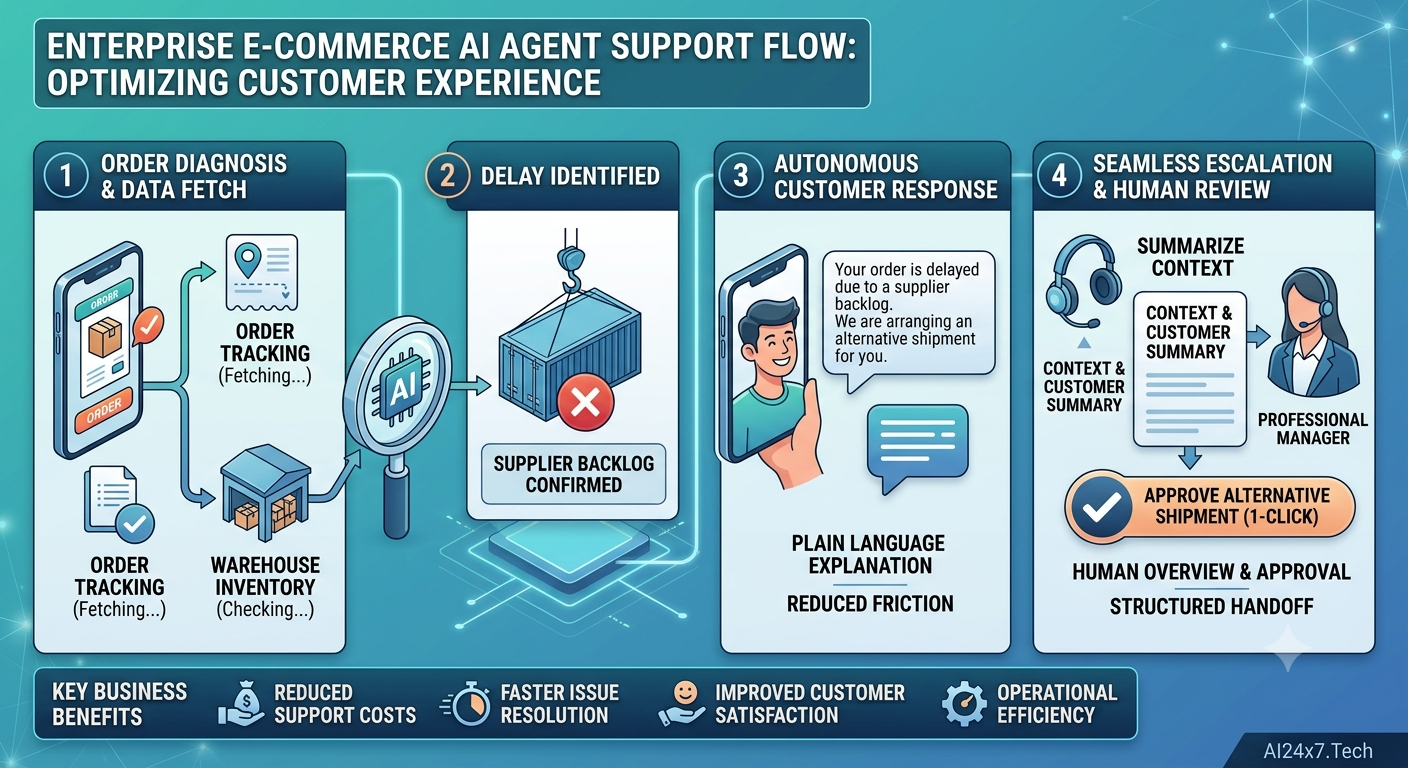
In e-commerce support engineering, standard conversational bots break down the moment a customer issue spans multiple internal microservices. Consider a common scenario: an incoming delivery delay caused by a supplier backlog across external ERPs, fulfillment centers, and Shopify APIs.
Traditional chatbots needs to be improved due to three core friction points:
- Unconstrained API Rate Limits & Tight Coupling: Hardcoding direct REST/GraphQL calls inside LLM tool signatures creates brittle architectures that quickly trigger API rate limits and choke under load.
- Context Window Inflation & State Loss: Multi-turn diagnostic conversations that fetch raw order histories rapidly fill LLM context windows, spiking costs and causing state drift.
- Privilege Escalation Risks: Allowing an unmonitored LLM agent to execute high-value mutation operations (e.g., creating re-shipments or issuing refunds) directly from customer input creates severe security vulnerabilities.
To solve this, enterprise support architectures must decouple tool execution via Model Context Protocol (MCP), enforce deterministic orchestration using LangGraph state machines, and place strict Role-Based Access Control (RBAC) guardrails between customer-facing responses and store manager execution gates.
1. The Architectural Blueprint
This architecture isolates external system integrations into a dedicated Shopify MCP Server. A LangGraph Execution Engine manages state and reasoning, exposed to a ReactJS client application through a stateless Flask API Gateway.
Plaintext
                                  +---------------------------------------+
                                  |         ReactJS UI Client             |
                                  | (Customer View vs Store Manager View) |
                                  +------------------+--------------------+
                                                     |
                                            HTTPS / Bearer JWT
                                                     |
                                                     v
                                  +---------------------------------------+
                                  |         Flask API Gateway             |
                                  |   (RBAC & Auth Context Injection)     |
                                  +------------------+--------------------+
                                                     |
                                                     v
                                  +---------------------------------------+
                                  |     LangGraph Orchestrator (FSM)      |
                                  |   +-------------------------------+   |
                                  |   | Triage Node -> Supplier Node  |   |
                                  |   +---------------+---------------+   |
                                  |                   |                   |
                                  |                   v                   |
                                  |   +-------------------------------+   |
                                  |   | HITL Interrupt (Manager Gate) |   |
                                  |   +-------------------------------+   |
                                  +------------------+--------------------+
                                                     |
                                               MCP JSON-RPC
                                                     |
                                                     v
                                  +---------------------------------------+
                                  |          Shopify MCP Server           |
                                  | (Exposes Read Tools & Manager Mutations)|
                                  +------------------+--------------------+
                                                     |
                                                     v
                                  +---------------------------------------+
                                  |     Shopify GraphQL / ERP Backend     |
                                  +---------------------------------------+
Directory Structure
Plaintext
enterprise-support-agent/
├── config/
│   ├── settings.py              # Environment variables, model bounds, RBAC matrices
│   └── mcp_servers.json         # MCP server endpoint registrations
├── src/
│   ├── mcp/
│   │   └── shopify_client.py    # Async MCP Client harness for protocol invocation
│   ├── state/
│   │   └── schema.py            # TypedDict state schemas and message reducers
│   ├── nodes/
│   │   ├── triage.py            # Order diagnostic & status node
│   │   ├── supplier.py          # Warehouse backlog checking node
│   │   ├── responder.py         # Customer-facing plain language summary
│   │   └── escalation.py        # HITL structured summary node for managers
│   ├── edges/
│   │   └── guardrails.py        # RBAC routing and deterministic conditional logic
│   └── graph.py                 # Compiled StateGraph with persistent checkpointers
├── app.py                       # Flask API interface exposing agent routes
├── requirements.txt
└── README.md
2. Step-by-Step Implementation
Step 1: Define the Shopify Model Context Protocol (MCP) Configuration
Model Context Protocol (MCP) standardizes how agents discover and execute tools. We define read-only diagnostic tools for general queries and restricted mutating tools (e.g., create_alternative_shipment) that require elevated privileges.
JSON
// config/mcp_servers.json
{
  "mcpServers": {
    "shopify_inventory": {
      "command": "python",
      "args": ["-m", "mcp_shopify_service.server"],
      "env": {
        "SHOPIFY_API_VERSION": "2026-01",
        "SHOPIFY_STORE_DOMAIN": "enterprise-store.myshopify.com"
      },
      "tools": [
        {
          "name": "get_order_tracking",
          "description": "Fetch real-time tracking data and fulfillment status.",
          "rbac_role": "customer"
        },
        {
          "name": "check_supplier_backlog",
          "description": "Cross-reference line items against warehouse backlog database.",
          "rbac_role": "customer"
        },
        {
          "name": "create_alternative_shipment",
          "description": "Re-routes order to alternative fulfillment center. Requires approval.",
          "rbac_role": "store_manager"
        }
      ]
    }
  }
}
Step 2: Build Strongly Typed LangGraph State with Role Context
State management must track the actor’s active role (customer vs. store_manager) along with diagnostic outputs to prevent unauthorized state transitions.
Python
# src/state/schema.py
from typing import Annotated, Sequence, TypedDict, Literal, Optional
from langchain_core.messages import BaseMessage
from langgraph.graph.message import add_messages
import operator

class EscalationPayload(TypedDict):
    order_id: str
    customer_id: str
    delay_reason: str
    recommended_action: str
    supplier_backlog_confirmed: bool

class SupportAgentState(TypedDict):
    messages: Annotated[Sequence[BaseMessage], add_messages]
    user_id: str
    user_role: Literal["customer", "store_manager"]
    order_id: str
    tracking_data: Optional[dict]
    supplier_backlog_flag: bool
    escalation_required: bool
    escalation_summary: Optional[EscalationPayload]
    iteration_count: Annotated[int, operator.add]
    next_action: Optional[Literal["triage", "check_supplier", "respond", "escalate_to_manager", "END"]]
Step 3: Implement Deterministic Guardrails & Nodes
Nodes must perform single, explicit functions. The router checks both the system state and the user’s RBAC role before directing execution to mutating actions.
Python
# src/edges/guardrails.py
from typing import Literal
from src.state.schema import SupportAgentState

def rbac_guardrail_router(state: SupportAgentState) -> Literal["respond", "escalate_to_manager", "execute_mutation"]:
    """Enforces role-based execution boundaries based on state context."""

    # Infinite loop circuit breaker
    if state.get("iteration_count", 0) > 5:
        return "escalate_to_manager"

    # Escalation needed due to external supplier backlog
    if state.get("supplier_backlog_flag") and not state.get("escalation_required"):
        return "escalate_to_manager"

    # Restrict high-privilege execution paths to authorized managers
    if state.get("next_action") == "execute_mutation":
        if state.get("user_role") == "store_manager":
            return "execute_mutation"
        else:
            # Downgrade unauthorized customer attempts to an escalation summary
            return "escalate_to_manager"

    return "respond"
Python
# src/nodes/escalation.py
from langchain_core.messages import AIMessage
from src.state.schema import SupportAgentState, EscalationPayload

def generate_escalation_node(state: SupportAgentState) -> dict:
    """Formats structured issue summaries for store manager review."""

    payload: EscalationPayload = {
        "order_id": state["order_id"],
        "customer_id": state["user_id"],
        "delay_reason": "Upstream supplier backlog verified at distribution hub.",
        "recommended_action": "Approve alternative shipment execution from Hub-B.",
        "supplier_backlog_confirmed": True
    }

    summary_msg = (
        f"[SYSTEM ESCALATION] Order {state['order_id']} delayed via supplier backlog. "
        "A structured handoff summary has been generated for store manager authorization."
    )

    return {
        "messages": [AIMessage(content=summary_msg)],
        "escalation_required": True,
        "escalation_summary": payload,
        "iteration_count": 1
    }
Step 4: Expose the Graph via Flask API with Human-in-the-Loop (HITL) Interrupts
The Flask API acts as the authentication boundary. It validates user roles from JWTs, populates the graph state, and manages human review gates via LangGraph’s checkpointer interrupts.
Python
# app.py
from flask import Flask, request, jsonify
from langchain_core.messages import HumanMessage
from langgraph.checkpoint.memory import MemorySaver
from langgraph.graph import StateGraph, START, END

from src.state.schema import SupportAgentState
from src.nodes.triage import triage_node
from src.nodes.supplier import check_supplier_node
from src.nodes.responder import response_node
from src.nodes.escalation import generate_escalation_node
from src.edges.guardrails import rbac_guardrail_router

app = Flask(__name__)

# Compile Graph with Checkpointing for HITL support
builder = StateGraph(SupportAgentState)
builder.add_node("triage", triage_node)
builder.add_node("check_supplier", check_supplier_node)
builder.add_node("responder", response_node)
builder.add_node("escalate_to_manager", generate_escalation_node)

builder.add_edge(START, "triage")
builder.add_edge("triage", "check_supplier")

builder.add_conditional_edges(
    "check_supplier",
    rbac_guardrail_router,
    {
        "respond": "responder",
        "escalate_to_manager": "escalate_to_manager",
        "execute_mutation": END
    }
)

builder.add_edge("responder", END)
builder.add_edge("escalate_to_manager", END)

checkpointer = MemorySaver()
# Interrupt execution before escalation to allow store manager intervention
agent_graph = builder.compile(checkpointer=checkpointer, interrupt_before=["escalate_to_manager"])

@app.route("/api/v1/agent/chat", methods=["POST"])
def handle_chat():
    data = request.json
    thread_id = data.get("thread_id")
    user_role = request.headers.get("X-User-Role", "customer") # Injected via JWT Middleware
    user_message = data.get("message")
    order_id = data.get("order_id")

    config = {"configurable": {"thread_id": thread_id}}

    initial_state = {
        "messages": [HumanMessage(content=user_message)],
        "user_id": data.get("user_id"),
        "user_role": user_role,
        "order_id": order_id,
        "iteration_count": 0
    }

    # Execute graph up to completion or human interrupt
    events = agent_graph.invoke(initial_state, config=config)

    # Check if graph paused at the manager escalation gate
    graph_state = agent_graph.get_state(config)
    if graph_state.next and "escalate_to_manager" in graph_state.next:
        return jsonify({
            "status": "escalated_to_manager",
            "message": "Your query involves an unexpected fulfillment delay. A store manager is reviewing alternative delivery options.",
            "escalation_details": graph_state.values.get("escalation_summary")
        }), 202

    return jsonify({
        "status": "success",
        "response": events["messages"][-1].content
    }), 200

if __name__ == "__main__":
    app.run(host="0.0.0.0", port=5000, debug=False)
3. Edge Cases, Token Optimization & FinOps
Running multi-turn diagnostic agents at scale requires active context and performance management:
Context Trimming & Static Prompt Caching
When querying supplier backlogs, full GraphQL JSON payloads can swallow thousands of tokens.
- Trim Message Buffers: Use LangChain’s
trim_messagesinside thetriagenode to keep only system instructions, active tool contexts, and the last 3 user/assistant turns. - Context Caching: Cache static system messages and tool schemas at the gateway level to reduce input token overhead on repetitive model invocations.
Python
# Token optimization pattern inside diagnostic nodes
from langchain_core.messages import trim_messages

def optimize_node_context(messages: list) -> list:
    return trim_messages(
        messages,
        max_tokens=1500,
        strategy="last",
        token_counter=len, # Replace with model-specific tokenizer in production
        allow_partial=False,
        start_on="human"
    )
Handling MCP Connection Drops
External MCP tools connecting to warehouse databases can experience network spikes or transient failures. Wrap tool calls in exponential backoff decorators:
Python
from tenacity import retry, stop_after_attempt, wait_exponential

@retry(stop=stop_after_attempt(3), wait=wait_exponential(multiplier=1, min=2, max=10))
async def safe_mcp_tool_call(client, tool_name: str, arguments: dict):
    return await client.call_tool(tool_name, arguments)
4. How AI24x7 Technologies Accelerates Enterprise AI Architectures
Navigating complex agent orchestrations, multi-tenant RBAC policies, and model performance controls requires deep infrastructure experience. At AI24x7 Technologies, we help enterprises build local-first and cloud-ready AI architectures designed for high reliability and predictable costs.
From implementing resilient Model Context Protocol harnesses to engineering zero-trust LangGraph state machines, we help teams eliminate technical debt and deploy agentic systems to production safely.
Building agentic systems for your enterprise? Skip the guesswork. Contact us at info@AI24x7.Tech to collaborate with our engineering team.